Track your planning application
Track your planning application
See exactly where your application is in the process - from submission to decision
See exactly where your application is in the process - from submission to decision
Haven't submitted yet?
Start here
The Planda Portal process
Understand every stage of the process, with AI validation ensuring your application is submission-ready before it reaches your council

Create your application on Planda Portal
Select application type
Complete forms and upload documents
Pay application fee
Application needs fixes
We guide you on fixing your application and notify you. Fix issues and Submit
Application is good
Planda Portal AI validation
We carefully review the application to verify that all required documents are present, forms are complete, and confirms compliance with council-specific requirements.
Key Feature
Sent to Planda Portal team
Final review: payment verification + council requirements check
Application sent to council within hours
Waiting for council to confirm receipt
Accepted by council
Your application is assigned to a planning officer who reviews and verifies all documents, checks drawings against requirements, confirms the application fee, reviews the site location and planning constraints, and conducts an initial assessment of your proposal against planning policies.
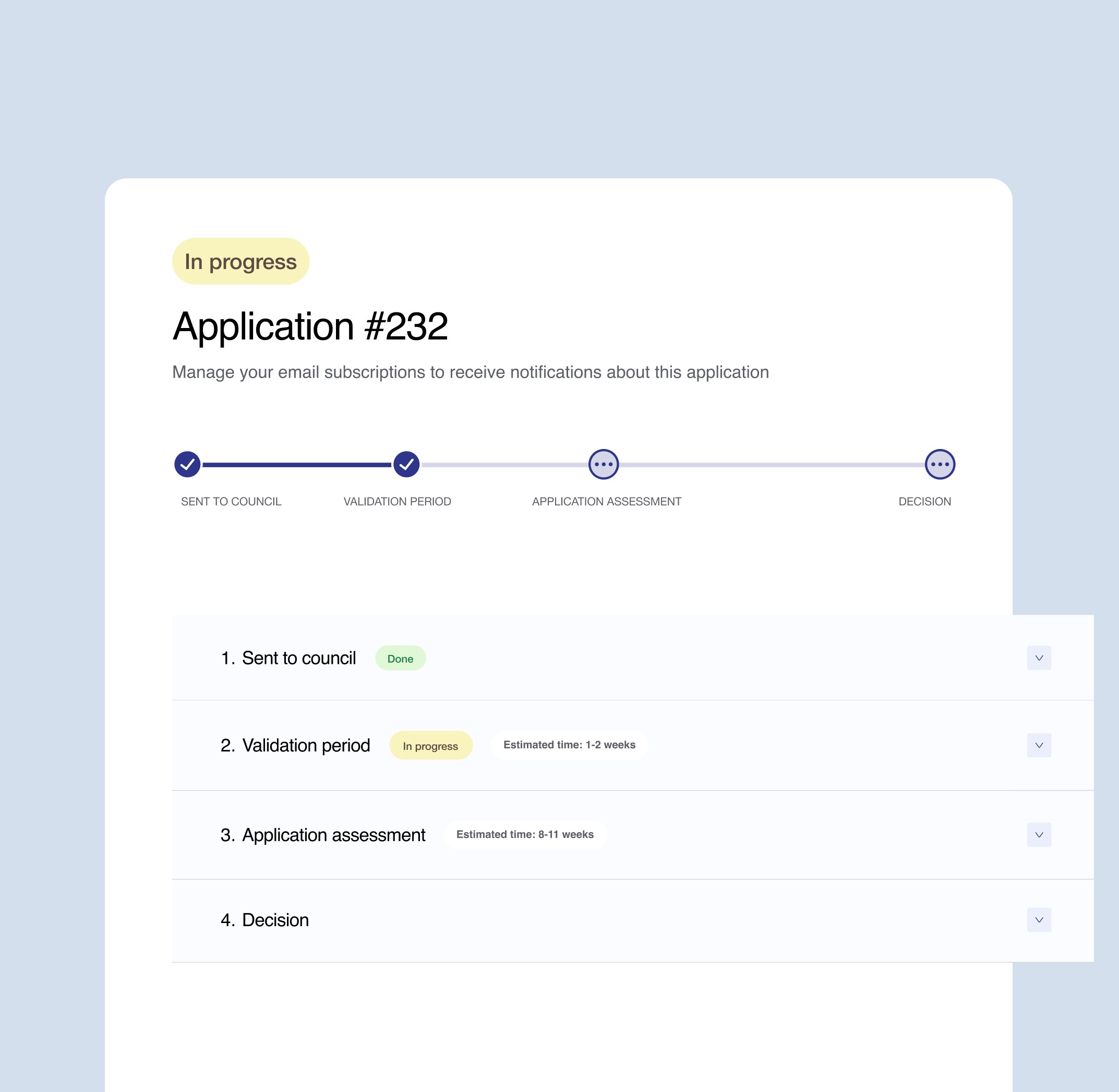
Track your application
See real-time status updates on Planda Portal dashboard
Receive email notifications at key milestones
View current stage and next expected action
Monitor progress from submission to final decision
Access full application history and timeline
Key Feature
8-11 weeks
Validated by council
The planning officer may carry out a site visit, review neighbour comments and consultations, assess compliance with planning policies and impacts on neighbours, street scene, daylight, and privacy, then prepare a planning report with recommendations and conditions where appropriate.
Decision made by council
The planning officer reviews all plans, documents, and consultation responses to assess the full impact of your proposal.
A final decision summary is prepared and the decision is issued as either Permission Granted, Permission Granted with Conditions, or Permission Refused.
If permission is refused
You can appeal to the Secretary of State here. You can revise your proposal and submit a new application through Planda Portal.
If permission is granted
You can start work within the time limit, must comply with all planning conditions, and should notify the council when work commences.
Create your application on Planda Portal
Select application type
Complete forms and upload documents
Pay application fee
Application needs fixes
We guide you on fixing your application and notify you. Fix issues and Submit
Application is good
Planda Portal AI validation
We carefully review the application to verify that all required documents are present, forms are complete, and confirms compliance with council-specific requirements.
Key Feature
Sent to Planda Portal team
Final review: payment verification + council requirements check
Application sent to council within hours
Waiting for council to confirm receipt
Accepted by council
Your application is assigned to a planning officer who reviews and verifies all documents, checks drawings against requirements, confirms the application fee, reviews the site location and planning constraints, and conducts an initial assessment of your proposal against planning policies.
Track your application
See real-time status updates on Planda Portal dashboard
Receive email notifications at key milestones
View current stage and next expected action
Monitor progress from submission to final decision
Access full application history and timeline
Key Feature
8-11 weeks
Validated by council
The planning officer may carry out a site visit, review neighbour comments and consultations, assess compliance with planning policies and impacts on neighbours, street scene, daylight, and privacy, then prepare a planning report with recommendations and conditions where appropriate.
Decision made by council
The planning officer reviews all plans, documents, and consultation responses to assess the full impact of your proposal.
A final decision summary is prepared and the decision is issued as either Permission Granted, Permission Granted with Conditions, or Permission Refused.
If permission is refused
You can appeal to the Secretary of State here. You can revise your proposal and submit a new application through Planda Portal.
If permission is granted
You can start work within the time limit, must comply with all planning conditions, and should notify the council when work commences.
Get notified
when things change
Receive email notifications when your application moves to a new stage or when your council needs more information. What you'll be notified about:
Status Change
Status Change
Decision made
Decision made
Council requests for additional information
Council requests
for additional information



Frequently asked questions
When will I see my application in the tracker?
Immediately after submission.
What if my status hasn't changed?
Processing times vary by council. If you're concerned, contact your council.
How long does each stage take?
Validation typically takes 1-2 weeks. Assessment takes 8-13 weeks depending on application type. Check your council's average processing times.
Get the information you need


Help centre

Find answers to other common questions
Ready to start your planning application?
Join thousands of homeowners and developers who've simplified their planning journey
Ready to start your planning application?
Join thousands of homeowners and developers who've simplified their planning journey
Ready to start your planning application?
Join thousands of homeowners and developers who've simplified their planning journey